
On this page
Before you start
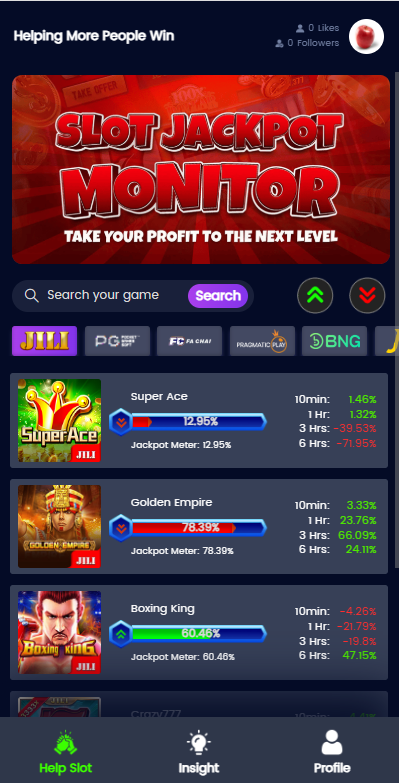
Open the HelpSlot.win web interface in your browser. The steps below follow the screenshots and recorded walkthrough; public browsing needs no account.
HelpSlotWin.asia is a separate editorial website. It does not collect credentials for the reviewed tool.
Step 1: Check the full domain
Enter www.helpslot.win. In the recorded walkthrough it redirected to https://www.helpslot.win/helpSlot. Similar names such as HelpSlotsWin.com and HelpSlotWin.ai identify separate sites.
Step 2: Identify the access format
The tested browser route needs no APK. No download or installation entry was found on inspected pages; a browser shortcut does not establish an official app release.
See the app and access guide for those distinctions.
Step 3: Browse without an account
Public browsing needs no sign-up; Profile requires login. Registration did not request an OTP, which does not establish identity checks or account security.
If you choose to register, check the site’s privacy information and use a password that is not shared with a casino or other service. The available evidence does not establish the operator’s legal identity.
Step 4: Observe the interface
Game cards show Jackpot Meter percentages and time-window values. Clicking cards or meters opened no details, signed in or out; they did not launch playable games or analysis screens.
Step 5: Search for a game or switch provider tabs
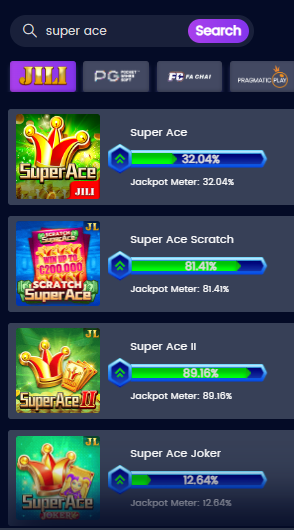
Enter a game name and use Search. The search example for “super ace” returns Super Ace and other similarly named titles, so check the exact title. Use provider tabs to filter the list; a visible provider logo does not prove official integration.

Step 6: Read the meter cautiously
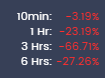
Read the Jackpot Meter separately from the 10min, 1 Hr, 3 Hrs and 6 Hrs figures. Some time-window figures are negative. The available record does not define their calculation, so do not describe them as profit, loss, RTP or a chance of winning.
For the terminology, read the jackpot meter guide and monitor overview.
Step 7: Use Profile if you choose to sign in
Profile includes Edit Profile, Share Profile, Contact Us and Share Post. The walkthrough describes game records in Share Post, not actual profit-and-loss data. Login did not unlock clickable cards or meters.
Keep passwords and financial details out of posts. If a link leaves the site, check its destination before interacting.
Mobile and browser verification routine
The narrow-screen screenshots do not establish every browser/device layout. A missing control does not make a similarly named mirror the same service.
Troubleshooting
Comparison: Problem, Safe response
Page will not load
- Safe response
- Recheck the domain, network, browser date/time and whether the service is currently accessible. Do not use a look-alike mirror automatically.
Login fails
- Safe response
- Confirm that the login belongs to the intended service. Use only the service’s verified recovery route; never send credentials to HelpSlotWin.asia.
App listing disappeared
- Safe response
- Do not replace it with an unknown APK. Recheck the publisher’s attributable official channels.
Meter does not update
- Safe response
- Record the observation. Do not assume a static display is live or that a change is due.
Game/provider not listed
- Safe response
- Do not use a similarly named game as a substitute or infer unsupported integration.
Different percentage on another site
- Safe response
- The tools may use different inputs or definitions. Compare methods before comparing numbers.
If troubleshooting fails, stop and mark the session incomplete. Avoid unknown mirrors, third-party recovery pages and credential sharing.
What the result does not mean
Important limitation: A displayed percentage, colour, recent result, trend, or session count does not by itself predict an independent future spin. This website does not provide guaranteed signals, winning probabilities, or advice to increase a player’s chance of winning.
Never raise a stake, chase a loss, or exceed a limit because a meter changed.
Use these steps to observe the interface, not forecast results. Keep to the limits set before opening it.
Frequently asked questions
Do I need an account to use HelpSlotWin?
No account was needed for browsing, search, provider switching or meters in the walkthrough. Profile requires login.
Can I use HelpSlotWin without downloading an APK?
Yes. The recorded browsing flow uses the web page. No download or installation entry was found on the inspected pages.
What does a high jackpot-meter percentage mean?
Only the publisher’s documented scale can define it. It does not automatically mean a high chance of winning.
How do I use HelpSlotWin for JILI?
Choose JILI and search the exact title, such as Super Ace or Golden Empire. A listed card does not establish integration or reliable prediction.
Why are my readings different from another website?
Different tools may use different inputs, update times, or publisher-defined formulas. If methods are not disclosed, the comparison cannot be validated.